We remain fully operational. Our teams are working around the clock to ensure your deliveries continue safely.

DOWNLOAD THE APP


Copyright © 2025 Desertcart Holdings Limited
DOWNLOAD THE APP
Buy anything from 5,000+ international stores. One checkout price. No surprise fees. Join 2M+ shoppers on Desertcart.
Desertcart purchases this item on your behalf and handles shipping, customs, and support to JORDAN.
📞 Elevate your desk game with Yealink’s cordless clarity and endurance!
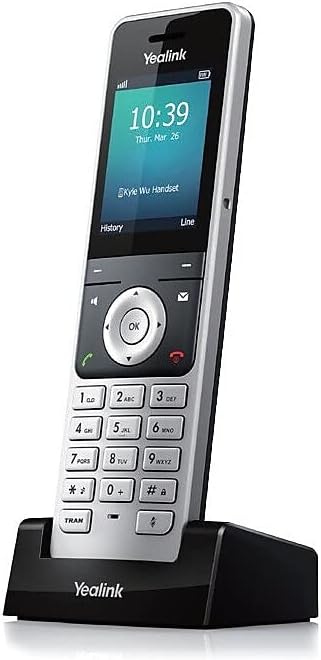
The Yealink W56H is a cordless DECT IP phone handset featuring a sharp 2.4-inch color LCD, exceptional HD wideband audio, and a 3.5mm headset jack for hands-free convenience. Designed for professionals on the move, it offers an impressive 400-hour standby time and 24 hours of talk time, complemented by an elegant illuminated keypad with lock function. Note: Base station sold separately.


| ASIN | B01FD4YDFU |
| Answering System Type | Digital |
| Best Sellers Rank | #22,518 in Office Products ( See Top 100 in Office Products ) #2 in VoIP Telephone Handsets |
| Brand | Yealink |
| Built-In Media | Adapter, Battery, Belt Clip, Charger, Handset, Quick Start Guide |
| Color | Silver |
| Compatible Devices | Microsoft Teams |
| Customer Reviews | 4.1 4.1 out of 5 stars (434) |
| Dialer Type | Keypad |
| Enclosure Material | Metal |
| Global Trade Identification Number | 06938818301337 |
| Is there Caller ID | Yes |
| Item Dimensions | 2.2 x 0.8 x 6 inches |
| Item Weight | 0.6 Pounds |
| Manufacturer | Yealink |
| Multiline Operation | Single-Line Operation |
| Number of Batteries | 2 AA batteries required. (included) |
| Phone Standby Time | 400 hours |
| Phone Talk Time | 24 Hours |
| Power Source | Battery Powered |
| Telephone Type | Cordless |
| UPC | 722580012814 753459086568 |
| Warranty Description | 1 year |
R**Y
Great buy
These phones are great. Use them at work
K**B
good stuff
These were exactly what I was hoping for. They're working great for my software-based PBX. The features are limited compared to some corded models; but they're a huge improvement over analog cordless phones. Call quality is good, as is speakerphone functionality. Range is meeting my needs so far.
J**E
Voice clarity awesome. Signal strength is as advertised!
I recently upgraded my three Grandstream Voip cordless phones to YEA-W56H. The YEA-W56H are an order of magnitude better. Voice clarity is as good as any landline. Another plus is I can roam around my large rambler house without losing call dropping. I even get a great signal down in the basement. Configuration/ pairing couldn't be simpler.
B**R
Old Version Shipped/Can't Change Date & Time
Ordered this Yealink W56H handset with a color display as an additional extension to the W60P base station I got on a separate order. However, Verizon shipped an older black/white display version with a menuing system that is worse than the menuing system on the flip-phones of 20 yrs. ago. In addition, the phone came with an international time zone and date format. Even after connecting this to the Yealink W60P base unit, the handset would not save the date/time formatting and entries that I would save via the handset. I even reset the base station and the handsets to factory settings and re-started the base station; reconnected the handsets to the base station, and tried to reset the time/date on the handsets again, but with the same result. After a couple of hours of research on Google, it appears the date/time format, etc. is "pushed" from the base unit to the handsets, so to change them on the handsets, you have to change them on the base station. Changing the time zone and formats on the base station requires using a graphical user interface (GUI) that exists on the base station. This requires accessing the base station by entering the IP Address of the base station in your laptop browser. Once you do that, the GUI asks you for your default User ID and Password, that do not appear anywhere in the documentation. The Yealink website is designed for IT telephony professionals, so the only documentation that's non-technical is the Quick Start guide that comes with the base station, which does not contain the default User ID/Password combo. No documentation whatsoever comes with the handset and there's no support telephone number to call. So, the bottom line, is I'm returning the handset and will buy a newer one or another brand from some other source.
J**R
Might help you to read this.
I had a lot of trouble getting the firmware to go in with the used ones I purchased. In short, what I ended up doing was downgrading the base which brought all the phones together to flash an older firmware. Then I upgraded the base to the newest version. With all phones connected to the base I setup the ftp server. Inserted the settings for the phones to pick up the older version. Downgraded the base and on it's restart the phones took the older firmware. Then updating the config to the new version while the base was upgrading to the newest version. Once the base booted up all the phones grabbed the new update and I disconnected the ftp server. Life is good.
C**Y
Great for Facilities
We ordered this for the residents at my job, as our old ones stopped working. They are a little difficult to get connected, otherwise nice product.
W**S
If you're looking for a SIP DECT solution, this is it!
I have SIP phone service. This DECT solution is perfect for those who want the convenience of a cordless which can work with SIP telephone service. Easy to read display and easy to read buttons with a good feel. Range and battery life are excellent!
C**S
Packed well
Good product
J**D
Great product.. sadly was sent from europe with non australian wall plug..
M**L
téléphone IP parfait pour compléter mon kit W60H. Facile à appairer avec la base. Son puissant et de qualité. Je l'ai complété par un casque avec prise jack 3.5 pour les longues conversations.
J**F
Great phone. Battery lasts for long time with moderate use. Very durable. Has been dropped a few times and jonissues. Belt clip feels a little weak, but as long as you dont get hooked on anything, It should be good.
T**R
Seems a lot of reviews are from people who didn't get the right plug attachment in the box, but they should really mention whom they bought it from so they can name-and-shame! Having bought the separate phone (W56H) and in a bundle with a W60B (H for Handset, B for base), I would recommend NetXL and LiGO to be sure of a UK plug. (This phone is now a little older than newer models, but in terms of functionality, I don't think it's missing anything important. It feels mid-high range in quality and it still gets sold with newer base stations e.g. W70B and hence still continues (at this time) to get firmware updates to work with those. When I recently purchased this phone, this one was up-to-date already :) ) It's got a few wallpapers, ways to display the time, few ringtones to choose from, looks nice and modern. Button tone and backlight are configurable etc. It's quite expensive as handhelds go, but hopefully means it will last a LONG time. It does seem to have decent battery life when it's taken off its charger stand for a couple of weeks. The phone's charger stand can also go in a USB slot. I have to say, for the average person, setting up these phones PROPERLY may be a bit difficult. I'm a linux veteran of 15 years, 25 years of Windows and there are many settings on the server for the base station that I would just never use or aren't fully sure what they do. It's also a VERY GOOD thing that they offer so much customisation and access to settings in a modern age where everything is dumbed down and totally unhelpful to troubleshoot. Short of a massive writeup in an amazon review, I would give my recommendations for a standard UK household who's interested in switching to a VOIP phone. We have two of these phones (one upstairs, one down) and a W60B base station, and linked them to the one VOIP account to ring at the same time. * We currently have a subscription with YAY. They only offer a couple of tiers, but their basic one gives you 100 minutes free to landline and mobiles and you can top credit up. They also have encryption to and from them (not the rest of the way obviously), so you can select TLS-SIP etc but you must set it up yourself with the instructions on their site. Call rates are always better than landline but there may be more appropriate providers for your usecase. Look around. * We have all devices in the house set to fixed LAN IPs. At the very least, you should have your voip's base station fixed (so it doesn't change if anything gets rebooted). That chosen IP in a web browser will give you access to change settings. I think you can make most necessary changes using the phone itself (especially if your setup has an ATA "adapter"), but firmware updates and making house-wide (multiple phones at once) changes would be terribly boring going phone to phone without a centralised management you get in the base station. *For updates, I think the only way is to download the rom from Yealink's site, upload the rom to the base station and then selecti Firmware Update with the phone - I would always recommend updating internet-facing devices or devices that might get important fixes. I was looking for an alternative for this phone, I might go something with a camera/viewscreen to make video calls, but then that's VERY gimmicky when you've got your mobile (which could use a related app), or your desktop/laptop etc with a separate (turnoffable) webcam which will also have a better quality fps and resolution, letting you sit comfortably in your chair rather than straining over a phone lol
S**.
Telefono serio, professionale
Trustpilot
4 days ago
2 days ago